Windows Sound Recorder Online: The sndrec32 You Remember, in Your Browser
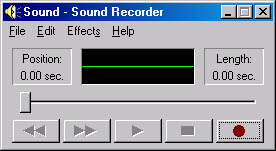
If you recorded voiceovers, rough ideas, or quick guitar takes in the 2000s, you probably used Windows Sound Recorder. That little app with the cassette tape buttons. The green waveform. The red record button. The file browser that took three clicks to navigate.
It was clunky. It was slow. It had limitations that made you want to pull your hair out. And it’s gone now—removed from Windows 10, missing entirely from Windows 11. But for songwriters, podcasters, and musicians, it was often the path of least resistance: just press record, speak/play, and you had a WAV file. No subscription. No account. No setup.
We’ve rebuilt that for you, free, in your browser.
Why Windows Sound Recorder Mattered
Modern recording software is objectively better. Audacity, GarageBand, even the free tier of Reaper give you waveform editing, gain control, and effects. But they also give you 47 buttons you don’t need, install processes, and permission dialogs.
Windows Sound Recorder had one advantage: it got out of your way. Open → record → play back → save. Done. No mixing, no mastering, no decisions. Just the capture.
Songwriters still reach for that workflow. You’re in a coffee shop with a melody. You don’t want to open Audacity. You want to press a button and have a 30-second voice memo that you can download. You want it to feel like you just grabbed a cassette recorder off a shelf.
The nostalgia is real. But the utility is more real.
What You Can Do With It
Record audio from your microphone. Speak, sing, play an instrument. The app captures it in real-time with a live waveform display so you can see your input level.
Play it back immediately. Press play, listen, decide if you want to keep it or record again.
Save as WAV. Download the file to your computer. WAV is lossless and works everywhere—Audacity, GarageBand, your DAW, YouTube.
No mic? No problem. You can record system audio (your browser playing music, a YouTube video, a Spotify track) if your operating system allows it.
That’s it. No effects, no mixing, no learning curve. Just the capture.
How It Works
- Click the red button. The browser asks for microphone permission (one time only).
- Speak or play music. The green waveform shows you what’s being captured in real-time.
- Click stop. The recording lands on the right side of the interface.
- Play it back. Press the play button to verify. Hear something wrong? Click record again.
- Download. The download button saves your audio as a WAV file.
That’s the entire interface. No menus. No hidden features. One input, one output.
Why This Matters Now
Audio recording in the browser has become reliable. The Web Audio API is stable, supported on every modern browser (Chrome, Firefox, Safari, Edge), and works on desktop and mobile.
But nobody else is building this interface. They’re all building the “pro” version—the one with effects chains and multitrack workflows. They’re forgetting that sometimes a songwriter just needs to capture an idea before it vanishes.
We built this because we missed it.
A Note on Storage
Your recording stays in your browser until you download it. We don’t store it on our servers. We don’t send it anywhere. It’s yours—you control whether it stays or gets deleted.
Limitations (and Why They Matter)
- 60-second limit. Longer recordings drain memory. If you need to record a full song, record it in sections.
- No editing. You can’t trim the start or fade the end inside the app. Use Audacity (free) for that.
- No effects. No reverb, no compression, no EQ. Just the raw capture.
- Phone or desktop. Works on both, but the experience is better with a real microphone on a computer.
These aren’t bugs. They’re intentional. We kept the scope small so the app could stay simple and fast.
FAQ
Does it actually sound like the old Windows Sound Recorder?
The interface design is inspired by sndrec32, but the underlying technology is completely modern. The old app used basic PCM encoding. This one uses the same format (16-bit WAV), so the quality is actually better because your hardware is better. The green waveform display works the same way: it’s just a canvas drawing the audio data in real-time.
Can I record longer than 60 seconds?
Not in the current version. The 60-second cap is a memory limitation—longer recordings use too much RAM on some browsers. If you need to record longer, record in multiple segments and stitch them together in a DAW.
What format does it save in?
WAV (Waveform Audio File Format). This is the same format the old Windows Sound Recorder used. It’s lossless, widely supported, and works in every DAW and editing tool. If you need MP3, Audacity can convert it in seconds.
Is my audio secure? Do you store it?
No. Your audio stays in your browser’s memory. When you download it, it goes to your Downloads folder. We don’t send it to our servers. We don’t log it. When you close the tab, it’s gone. The only way we know anything about your usage is through anonymized analytics events (like “user clicked record”).
Can I use this on my phone?
Yes. The interface works on mobile Safari and Chrome. You’ll need a microphone (headset, earpods, or your phone’s built-in mic). The experience is better on desktop because of screen space, but it works.
Why is there no “undo” button?
Undo in audio editors is complex—you need to store every version of the recording in memory. For a 60-second capture tool, the philosophy is simpler: if you don’t like it, record it again. This keeps the app lightweight and fast.
Can I record from Spotify/YouTube while using this?
This depends on your operating system and browser. On macOS, some browsers let you record system audio. On Windows, you may need to use a virtual audio cable. It’s a limitation of the browser security model, not the app itself.
What browsers does it work on?
Chrome, Firefox, Safari, and Edge. It requires a modern browser (2020 or newer) with Web Audio API support. If you’re on Internet Explorer or an older browser, you won’t be able to use it.
Start Recording Free
No signup. No download. No installation. Just open it and press record.
The green waveform is waiting.